Main Odoo Modules – Required Field Mapping
With our Gravity Forms to Odoo, you can easily send data from your WordPress forms to key Odoo modules. Below is a guide covering the most relevant modules, the mandatory fields required for successful integration, and optional fields you can map for enhanced functionality.
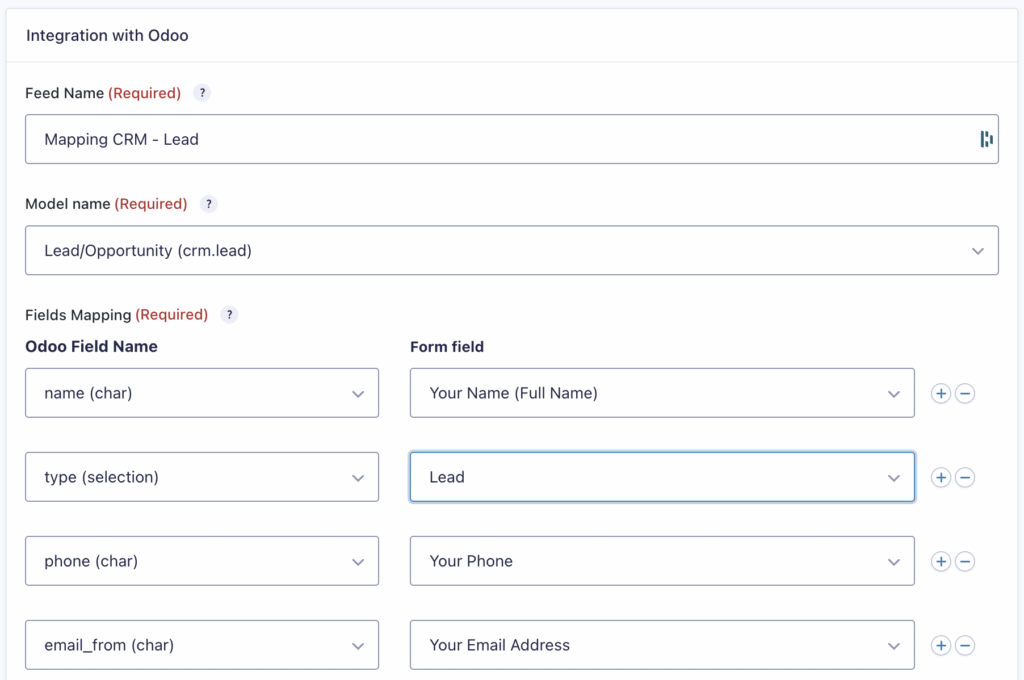
CRM Leads & Opportunities (crm.lead)
Convert form submissions into leads or opportunities automatically.
Use Case: Contact forms, demo requests, quote inquiries.
Required Fields
| Odoo Field | Description | Gravity Forms Field Type |
|---|---|---|
name | Lead/Opportunity Name | Text |
type | Lead or Opportunity Type | Hidden/Select |
email_from | Email of Contact | |
phone | Phone Number | Phone |
Optional Fields
description: Additional notespartner_name: Company namepriority: Importance levelsource_id: Source of the lead
| Odoo Field | Description | Gravity Forms Field Type |
|---|---|---|
contact_name | Contact Name | Text |
description | Description of the Lead | Paragraph Text |
priority | Priority Level | Dropdown |
tag_ids | Tags | Checkbox/Select |
Contacts & Companies (res.partner)
Sync customers, vendors, or companies collected from forms.
Use Case: Registration forms, contact management.
Required Fields
| Odoo Field | Description | Gravity Forms Field Type |
|---|---|---|
name | Full Name or Company | Text |
Optional Fields
| Odoo Field | Description | Gravity Forms Field Type |
|---|---|---|
street | Street Address | Text |
city | City | Text |
country_id | Country | Dropdown/Hidden |
vat | VAT Number | Text |
email | Email Address | |
phone | Phone Number | Phone |
company_type | Individual or company | Selection |
Countries (res.country)
Link Gravity Forms dropdowns to Odoo's built-in country list.
Use Case: Address forms, country-specific logic.
Required Fields
| Odoo Field | Description | Gravity Forms Field Type |
|---|---|---|
name | Country label | Text |
code | ISO code | Text |
phoe_code | Country code Reference | Number |
Optional Fields
| Odoo Field | Description | Gravity Forms Field Type |
|---|---|---|
address_format | Defines how the address is displayed for this country using templates. | Text |
name_position | Sets whether the contact name appears before or after the company name. | Text |
vat_label | Custom label for the VAT field. Use this field if you want to change VAT label | Text |
state_required | Indicates if the state/province field is mandatory. | Selection |
zip_required | Indicates if the postal code field is mandatory. | Selection |
Sales Orders (sale.order)*
Generate sales orders or quotations directly from form data.
Use Case: Order forms, B2B quote requests.
Required Fields
| Odoo Field | Description | Gravity Forms Field Type |
|---|---|---|
name | Customer's Name | Text |
partner_id | Customer | Text / Number |
order_line | Order Line Items | Repeater / Nested |
Invoices / Journal Entry (account.move)*
Send data to create draft invoices based on submissions.
Use Case: Subscription signups, service payments.
Required Fields
| Odoo Field | Description | Gravity Forms Field Type |
|---|---|---|
partner_id | Customer | Hidden/Select |
journal_id | Journal | Select/Hidden |
invoice_line_ids | Items | Repeater / Nested |
move_type | Invoice type (out_invoice, in_invoice, etc.) | Hidden / Select |
invoice_date | Invoice Date | Date |
Optional Fields
| Odoo Field | Description | Gravity Forms Field Type |
|---|---|---|
payment_reference | Payment Ref | Text |
invoice_date | Invoice Date | Date Picker |
payment_term_id | Payment Terms | Dropdown/Select |
ref | Customer reference | Text |
invoice_date_due | Due date | Date |
invoice_source_email | Email source (e.g., from external system) | Email / Text |
narration | Internal notes | Paragraph / HTML |
Delivery Orders (stock.picking)
Trigger inventory movements such as deliveries or transfers.
Use Case: Shipping requests, internal transfers.
Required Fields
location_id: Source locationlocation_dest_id: Destination locationpicking_type_id: Operation type
| Odoo Field | Description | Gravity Forms Field Type |
|---|---|---|
location_id | Source Location | Dropdown/Hidden |
location_dest_id | Destination Location | Dropdown/Hidden |
Optional Fields
move_lines: Specific product transfersscheduled_date
| Odoo Field | Description | Gravity Forms Field Type |
|---|---|---|
move_lines | Stock Items | Repeater/Nested |
scheduled_date | Delivery Date | Date Picker |
Tasks (project.task) – Project (project.project)
Create tasks or projects for teams based on internal or external form submissions.
Use Case: Feature requests, bug reports, project tracking.
Required Fields
| Odoo Field | Description | Gravity Forms Field Type |
|---|---|---|
name | Task Title | Text |
Optional Fields
| Odoo Field | Description | Gravity Forms Field Type |
|---|---|---|
deadline | Task Deadline | Date Picker |
description | Task Description | Paragraph Text |
Helpdesk Tickets (helpdesk.ticket)**
Transform form responses into tickets for customer support.
Use Case: Support requests, warranty claims.
Required Fields
| Odoo Field | Description | Gravity Forms Field Type |
|---|---|---|
name | Ticket Title | Text |
partner_id | Customer | Hidden/Select |
Optional Fields
| Odoo Field | Description | Gravity Forms Field Type |
|---|---|---|
tag_ids | Tags | Checkbox/Select |
priority | Priority Level | Dropdown |
stage_id | Ticket Stage | Dropdown/Hidden |
Users (res.users)
Assign tasks, leads, or tickets to specific people based on logic.
Use Case: Round-robin assignment, department-based routing.
Required Fields
user_idorassigned_user_id: ID of the user
| Odoo Field | Description | Gravity Forms Field Type |
|---|---|---|
login | Username | Text |
name | Customer's name | Text |
email | Customer's email | Text |
* Not supported 100%, contact our support for more info
** Need Odoo Upgrade