You gave us 4.86 on wp.org
Display your Airtable data in wpDataTables.
Live, styled, always up to date.
- Version 1.1.0
- Since 2025
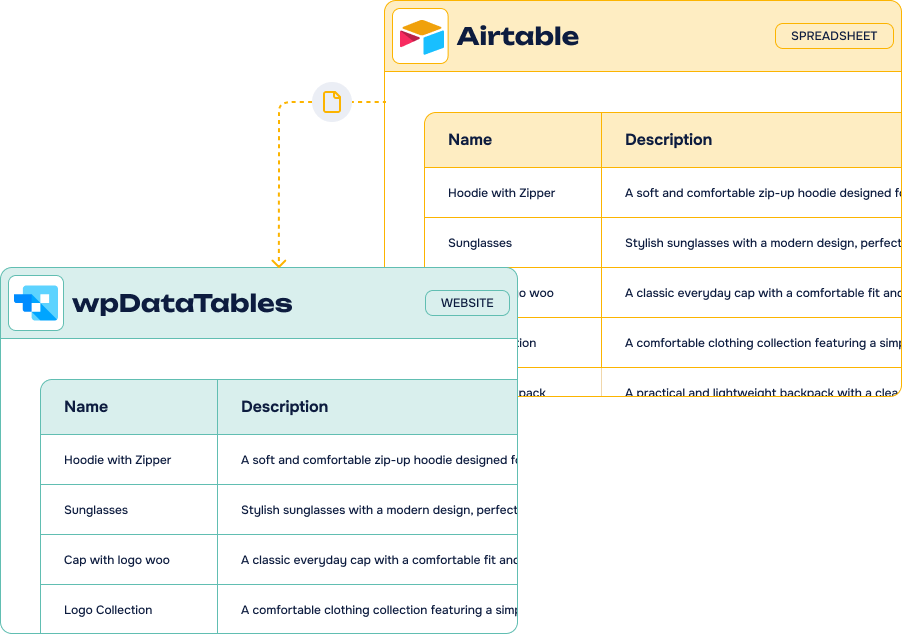
The wpDataTables Airtable Add-On pulls your Airtable base straight into wpDataTables: pick a base, a table and a view, choose the columns you want to show and embed a responsive table anywhere on your WordPress site. No manual import, no code.
14-day Money Back Guarantee
Key features
-
Live
syncingYour tables reflect your Airtable content in real time, with no manual import
-
Multiple bases & views
Connect as many Airtable bases, tables and views as your project needs
-
Column control
Hide, rename and reorder the columns you display, straight from your dashboard
-
Formula columns
Add calculated columns on top of your Airtable data before displaying it
-
Embed anywhere
Drop your table into any page or post with a simple shortcode
-
No third-party platform
A direct Airtable API connection, without Zapier, n8n or Make in the middle
-
With free wpDataTables
No Pro version of wpDataTables required to get started
-
Filtering & sorting
Your visitors get the responsive, searchable tables wpDataTables is known for
It’s easy to connect Airtable and wpDataTables using our Add-On
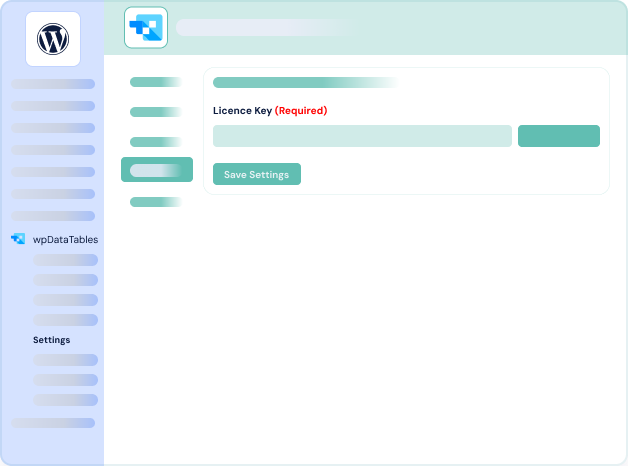
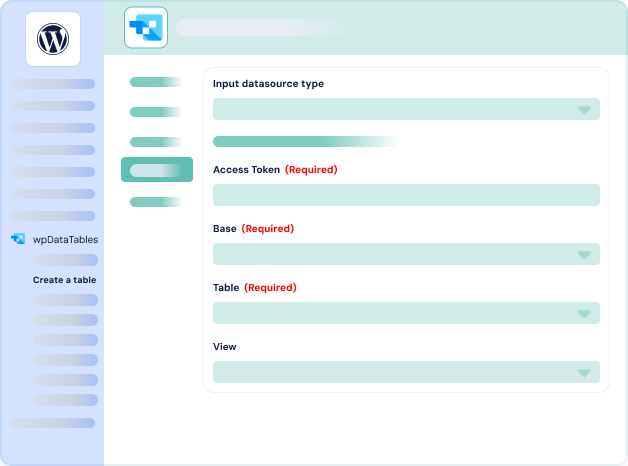
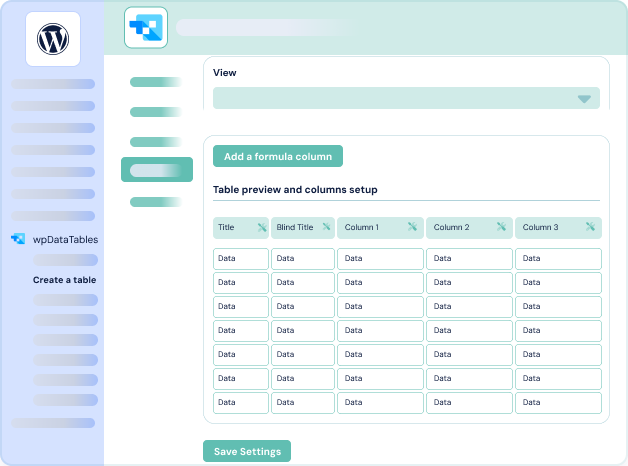
What can you do with the wpDataTables Airtable Add-On?
Our Airtable integration for the wpDataTables WordPress plugin brings powerful data display capabilities to your site: connect your Airtable databases and show their content in beautiful, responsive WordPress tables — no manual importing required. Perfect for teams that already manage projects, data or content in Airtable.
-
Reports & dashboards
Publish live reports built on your Airtable data, and let your tables update themselves whenever the base changes.
-
Product & price lists
Keep catalogues, inventories and price lists in Airtable, and display them on your site without touching a page again.
-
Directories & listings
Turn an Airtable base into a searchable directory — members, partners, resources — with filtering and sorting out of the box.
-
Schedules & programmes
Show event programmes, opening hours or availability tables that your team edits in Airtable.
-
Form submissions
Display the entries collected by your forms in a clean public table, with only the columns you choose to expose.
wpDataTables Airtable Add-On: incredible features, fair pricing
Most popular
Pro plan
$50.00 /year
$150.00 /year
$200.00 /year
All Features you need
- Included: Connect multiple Airtable bases and views
- Included: Real-time syncing with your Airtable data
- Included: Customize visible columns (hide, rename, reorder)
- Included: Embed live tables anywhere via shortcode
- Included: Works with the free version of wpDataTables
- Included: One year of updates & priority support
-
Contact us
You need a special plan, integration services or custom development? We are here for you!
-
Guarantee
14-Day Money Back Guarantee
-
Switch your plan
Change your plan at anytime
Frequently asked questions
Find answers to the most common questions about the wpDataTables Airtable Add-On — from setup and syncing to licensing and support.
What is Airtable?
Offered in SaaS mode, Airtable is a database tool designed to create a simple online form and a project management environment or even a custom CRM. Equipped with an automatic translation function, Airtable manages multiple views: maps, calendars, Kanban boards, Gantt charts, etc. It’s an excellent platform for data integration and automating advanced workflows.
What is wpDataTables?
wpDataTables is a powerful WordPress plugin that allows you to create responsive, customizable, and interactive tables and charts directly from your data sources. It supports large datasets, filtering, editing, and real-time syncing with tools like Airtable, MySQL, and Google Sheets — all without writing code. Ideal for reports, dashboards, pricing tables, and more.
How to install your products?
You can install our WordPress plugins and add-ons by uploading them to your site. To do this, follow these steps:
- Download the plugin file to your computer after purchase it on wpconnect.co.
- Log in to your WordPress dashboard.
- On the left-hand side menu, click on “Plugins” and then “Add New”
- Click the “Upload Plugin” button at the top of the page.
- Click the “Choose File” button and select the plugin file you downloaded in Step 1.
- Click the “Install Now” button.
- Wait for the plugin to be installed, and then click the “Activate” button.
It’s important to note that our plugins and add-ons require additional steps to be fully configured and integrated into your site. Please follow the installations steps described below on the FAQ and our tutorials.
Can I use your wpDataTables Airtable Add-On with a free Airtable account and wpDataTables free?
Yes, you can use the wpDataTables Airtable Add-On with both a free Airtable account and the free version of wpDataTables.
Airtable’s free plan allows access to the API, which is all you need to connect and sync your data. It supports up to 1,000 records per base, which is usually enough to get started for small to medium-sized projects. You can view Airtable’s current plan limits and upgrade options on their pricing page.
The wpDataTables Airtable Add-On works smoothly even with the free version of wpDataTables — no Pro version required. For advanced features like charts, frontend editing, or server-side processing, you can upgrade wpDataTables at any time based on your needs.
wpDataTables Airtable Add-On connects your Airtable bases to wpDataTables, the WordPress plugin used to build responsive, interactive tables and charts.
Instead of exporting a CSV every time something changes, the Add-On reads your base through the Airtable API and keeps the table on your site in sync. You pick the base, the table and the view, decide which columns your visitors see, and embed the result with a shortcode.
Our Airtable integrations cover the whole round trip between WordPress and Airtable — importing content, sending form entries, and now displaying live Airtable data on your pages.
It is a no-code solution that works with a free Airtable account and with the free version of wpDataTables. No automation platform like Zapier or Make required.