Contact Form 7 integrations for WordPress
WP connect provides you with the best WordPress add-ons to seamlessly integrate Contact Form 7 with your favorite no-code tools, Airtable and Notion. Sync your web form entries in minutes, streamline your workflows and improve the management of your leads without any technical complexity, and completely free.

WordPress integrations for Contact Form 7
Unleash the full potential of your WordPress site and Contact Form 7. Discover the best add-ons to sync your web form entries with Notion or Airtable in minutes, without any technical complexity.
Install the add-on, paste your API key and map your form fields to the columns or properties of your choice. Every submission then lands where your team already works — no Zapier, no Make, no code.
Use cases for Contact Form 7 integrations
Synchronizing your WordPress form data with powerful no-code tools like Airtable and Notion offers endless possibilities and vast automation opportunities. Here are a few examples:
- Integrate quote requests into Notion for effective tracking and better team collaboration.
- Automatically send customer feedback from Contact Form 7 to Airtable for in-depth analysis and continuous improvement of your products and services.
- Transfer customer complaints and issues to Airtable for centralized management and rapid resolution.
- Transfer Contact Form 7 responses to Airtable to qualify and track your leads using scoring and automation.
So, what are you waiting for? Take advantage of the many benefits offered by integrating Contact Form 7 with Airtable or Notion today.
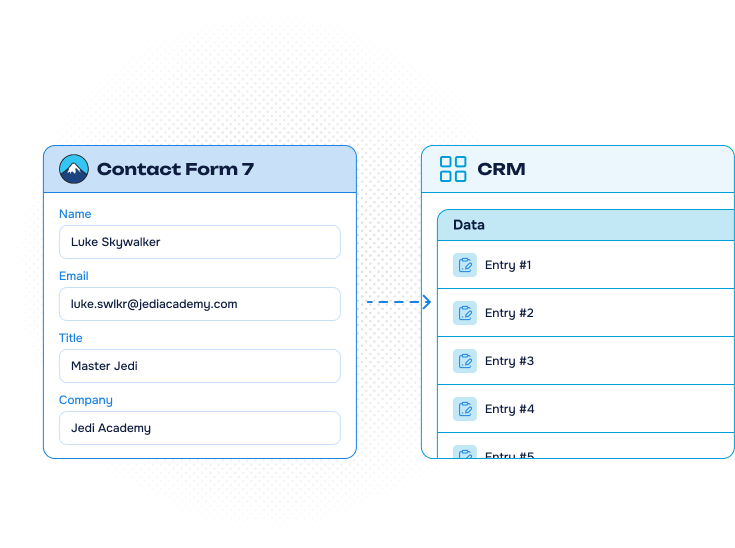
Our Contact Form 7
integrations
Connect your WordPress forms to the no-code tools your team already uses. Both add-ons are free, and neither needs a third-party automation platform.
-
Contact Form 7 to Airtable
Turn every submission into a row in your Airtable base.
Discover about Contact Form 7 to Airtable -
Contact Form 7 to Notion
Feed a Notion database without leaving WordPress.
Discover about Contact Form 7 to Notion



Contact Form 7 integrations: the benefits for you
-
Automate data collection
Integrating Contact Form 7 with Airtable or Notion automates data collection and management — which reduces human error and simplifies repetitive tasks.
-
Centralize your data
You centralize your entries for more efficient workflows, and benefit from the detailed reports and in-depth analysis of your no-code tool.
-
Free and no skills required
Quick and easy customization without technical skills, so you can tailor the integration to your needs. And best of all: it is completely free.
FAQ about Contact Form 7
integrations
How to configure your Contact Form 7 Add-ons?
To configure our Contact Form 7 add-ons, you will need to follow these specific instructions :
- Install and activate the add-on (follow the instructions on “How to install our plugins”)
- Go to the Contact Form 7 settings page (under Contact > Integration >Airtable/Notion)
- Enter the information requested by the plugin : Airtable/Notion’ API key
- Click Save Settings
- Create your form and then go to the tab Airtable/Notion
- Follow on-screen instructions for integrating with tools
How to use the Contact Form 7 Add-on with Airtable?
To use our Contact Form 7 add-on with Airtable, you will need to follow these specific instructions :
- Create a form with at least an e-mail field (don’t forget the consent field)
-
Use the drop-down menus to select your Base and Table.
- Click on “Save”
-
Map the fields of your Contact Form 7 form with your Airtable’s columns
- Click on “Save”
How to use the Contact Form 7 Add-on with Notion?
To use our Contact Form 7 add-on with Notion, you will need to follow these specific instructions :
- Create a form with at least an e-mail field (don’t forget the consent field)
- Go to the Notion tab and check the box “Add form submissions to your database” to activate the connection
- Choose the Notion’s database in which the data should be added
- Map the fields of your Contact Form 7 form with your Notion’s columns
- Click on “Save settings”
Want to know more? Check our articles!

Tutorials
Video Tutorial: Contact Form 7 to Notion
Connect Contact Form 7 to Notion and send website entries directly into a structured database. This video walks through token setup, field mapping, and testing the integration.

Tutorials
Video Tutorial: Contact Form 7 to Airtable
Send Contact Form 7 entries directly to Airtable instead of copying them manually. Follow the video to connect your table, map each field, and verify the integration.
News
Notion WP Sync Pro+ 3.0: more control and safer Notion-to-WordPress syncs
Explore safer Notion-to-WordPress workflows with configurable deletion handling, ACF support for users and terms, dependent connections, and updated WordPress and PHP compatibility.