Odoo integrations for WordPress & WooCommerce
Connect your WordPress data to Odoo with our no-code connectors. Our add-ons make it simple to create and automate workflows between Odoo and the tools your business already runs on: WooCommerce, WordPress, your CRM and your form builder.

Odoo and WordPress: two giants, one workflow
Odoo is an ERP and CRM with dozens of business modules, from accounting to inventory, stock tracking and project management. WordPress dominates the CMS market with an ecosystem of extensions for everything else.
Combining both gives you flexibility where it matters: your data is centralized, your operations are easier to steer, and our ready-to-use no-code connectors save the development time you would rather spend elsewhere.
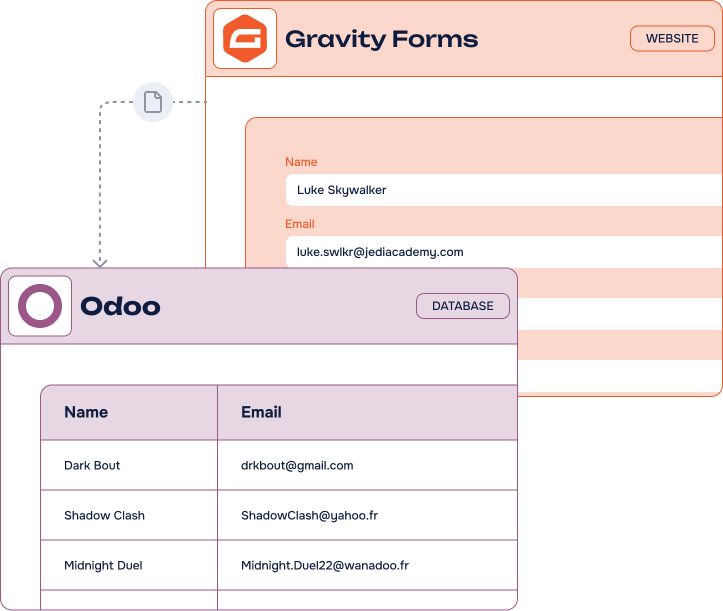
Why integrate WordPress & WooCommerce with Odoo?
Moving data from one application to another is no longer a luxury: it is what keeps your processes and your decisions clean. Every new tool adds an information silo, and silos make daily operations harder to read.
This is where no-code WordPress integrations pay off. In a few minutes you synchronize your tools and get a connected ecosystem — an organization built for growth instead of for copy-paste.
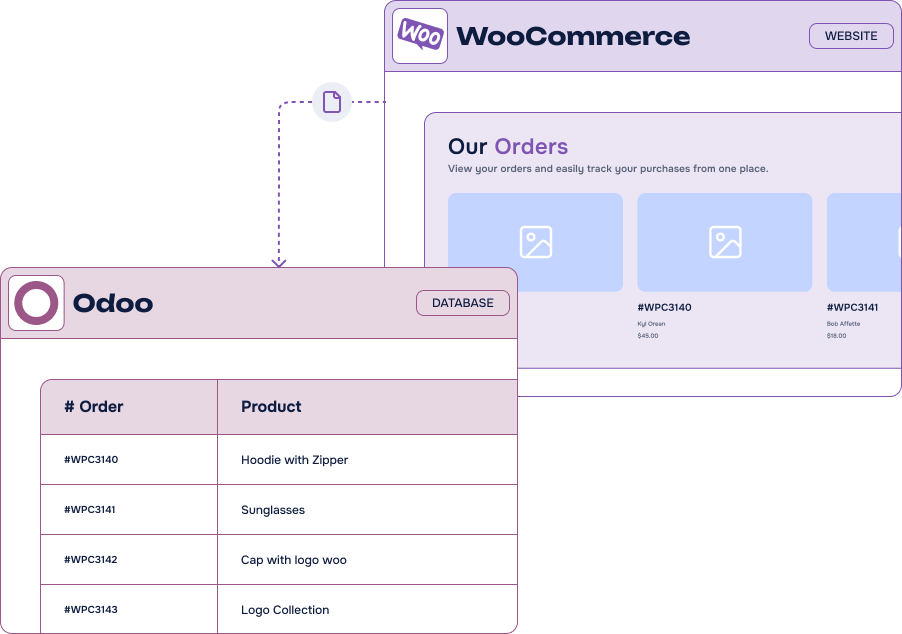
Why use our Odoo integrations?
With strong expertise in WordPress development, no-code and integration solutions, WP connect builds reliable, friendly connectors designed for simplicity and scale, at a fair cost.
-
No-code solutions
Save the time and the budget of a custom development. Our Odoo integrations are ready to use and need no technical skills.
-
Advanced automations
No more convoluted scenarios: automate in minutes through a simple interface, with the flexibility and speed you expect.
-
Centralized operations
Extend Odoo to cover every side of your business. Unifying your data and your operations is what makes a team faster.
Our Odoo
integrations
Two connectors, two ends of a WordPress site: the entries your forms collect, and the orders your store takes.
-
Gravity Forms
to OdooPush every form submission into your Odoo database — contacts, leads, CRM or any custom model — with dynamic field mapping.
Discover about Gravity Formsto Odoo -
WooCommerce Orders to Odoo
Every order placed on your store becomes a sales order in Odoo, with its customer, lines, taxes and shipping.
Discover about WooCommerce Orders to Odoo



Odoo integrations for WordPress: uses cases
Still wondering what integrating Odoo with your tools changes day to day? Here is what our users automate first.
-
Order synchronization
WooCommerce orders reach Odoo on their own for processing, with inventory and stock monitored in real time.
-
Project management
Web form data feeds your projects, so requirements and deadlines are visible to the whole team from the start.
-
Sales pipeline
New leads land directly in your Odoo CRM, ready for a sales team that can act while the prospect is still warm.
-
Automated workflows
A WordPress event triggers an Odoo scenario: a Gravity Forms lead can create a task, an alert and a contact at once.
-
Event registrations
Registrations collected on your site are centralized in Odoo, with its built-in follow-up emails and communications.
FAQ about
Odoo integrations
What is an Odoo integration?
An Odoo integration is a solution that extends the platform’s functionalities to other tools and applications. For example, an Odoo to WooCommerce integration connects both systems and facilitates data exchange between them.
Odoo, like WordPress, has opened API access to enable integrations with third-party tools. We provide you with WordPress API integrations solutions to connect these platforms seamlessly. This offers extensive possibilities for process optimization, automation and productivity.
Which tools do you integrate with Odoo?
We offer add-ons to connect WooCommerce and Gravity Forms with Odoo. Our modules are very simple to set up and require no technical skills.
We regularly develop new connectors that we also publish. Additionally, if you need a custom solution for a business tool, we can help you. Contact us for custom WordPress development and integration solutions.
How do your Odoo integrations work?
WP connect specializes in developing WordPress plugins and add-ons to integrate your tools. Our integrations are modules or plugins that you install and configure on your WordPress site.
The integrated tools communicate through API. But don’t worry. Our team handles all the technical aspects. You just need to provide simple details to configure your integrations. Feel free to check our documentation or contact our team if you have specific needs.
Want to know more? Check our articles!
News
Odoo WooCommerce connector: automatically sync your orders
Send WooCommerce orders to Odoo in real time with Sync WooCommerce Orders to Odoo, eliminating duplicate entry while keeping customer, product, payment, and order data aligned.
News
Notion WP Sync Pro+ 3.0: more control and safer Notion-to-WordPress syncs
Explore safer Notion-to-WordPress workflows with configurable deletion handling, ACF support for users and terms, dependent connections, and updated WordPress and PHP compatibility.
News
Export WooCommerce Products to Airtable: A Major New Feature in Air WP Sync for WooCommerce
Export your existing WooCommerce catalog to Airtable, then manage products from a centralized workspace and synchronize updates back to your store without rebuilding records manually.